
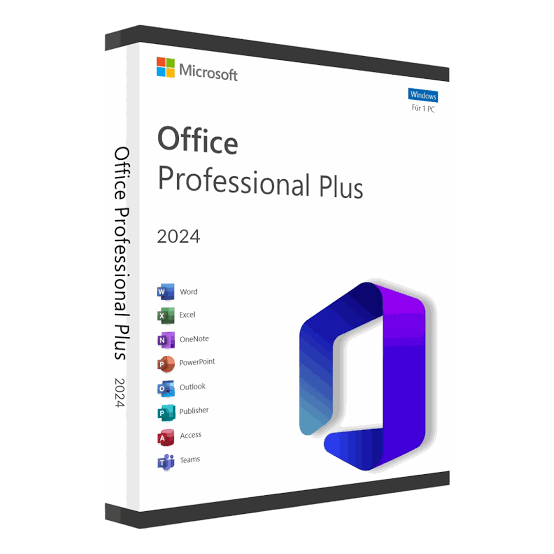


Microsoft Office 2024 Professional Plus Bind Key for Windows – Lifetime License
Microsoft Office 2024 Professional Plus – Lifetime License for Windows
Upgrade your productivity with Microsoft Office 2024 Professional Plus for Windows. This edition provides essential professional applications for creating documents, managing spreadsheets, preparing presentations, handling emails, and more.
This is a one-time/lifetime license intended for use on a Windows PC, with no recurring monthly or yearly subscription fee for the licensed product.
License Type: Lifetime / One-Time License
Edition: Microsoft Office 2024 Professional Plus
Platform: Windows PC
Delivery: Product Key / Bind Key
Activation: Online activation, subject to the license type and Microsoft’s activation requirements
Number of Devices: 1 PC
Subscription: No recurring subscription
Product: Digital/License Key
Applications Included
Microsoft Office Professional Plus 2024 includes professional productivity applications such as:
- Microsoft Word 2024 – Create and edit professional documents, reports, letters, resumes, and more.
- Microsoft Excel 2024 – Work with spreadsheets, formulas, calculations, charts, and data.
- Microsoft PowerPoint 2024 – Create professional presentations, slideshows, and business presentations.
- Microsoft Outlook 2024 – Manage email, calendars, contacts, and tasks.
- Microsoft Access 2024 – Create and manage databases. Availability depends on the specific Professional Plus licensing channel.
- Microsoft OneNote – Organize notes, ideas, information, and projects.
Microsoft lists Office LTSC Professional Plus 2024 as a volume-licensed suite containing classic Office applications, including Word, Excel, PowerPoint, Outlook and Access.
Key Features
Word 2024
- Professional document creation
- Advanced formatting tools
- Templates and document layouts
- Editing and proofreading features
- Improved recovery capabilities
Excel 2024
- Advanced formulas and functions
- Data analysis
- Charts and tables
- Spreadsheet management
- Improved productivity features
PowerPoint 2024
- Professional presentation creation
- Slide design tools
- Animations and transitions
- Presentation templates
- Improved accessibility features
Outlook 2024
- Email management
- Calendar management
- Contacts
- Tasks and scheduling
Access 2024
- Database creation and management
- Tables, forms, queries, and reports
- Suitable for professional and business data management
Microsoft confirms that Office 2024 introduces improvements including new Excel functions, accessibility improvements, enhanced Word session recovery, and other productivity enhancements.
Lifetime License – No Monthly Subscription
Unlike Microsoft 365 subscription plans, a perpetual Office license is purchased as a one-time license rather than a recurring subscription. Microsoft describes its non-subscription Office products as one-time purchases.
Important: “Lifetime” means the license does not require a recurring subscription fee. It does not mean that Microsoft will provide unlimited technical support or updates forever.
System Requirements
For Office LTSC Professional Plus 2024, Microsoft specifies:
- Operating System: Windows 11, Windows 11 LTSC 2024, Windows 10 LTSC 2021/2019, and supported Windows Server editions
- Processor: 1.1 GHz or faster, 2-core processor
- RAM: 4 GB
- Storage: 4 GB available disk space
- Display: 1280 × 768 or higher
- Architecture: 32-bit and 64-bit supported
- Internet connection required for installation and activation
Microsoft’s current documentation provides the detailed system requirements for Office LTSC 2024.
Product Benefits
✔ Microsoft Office 2024 Professional Plus
✔ Lifetime / perpetual license
✔ One-time purchase
✔ Suitable for Windows PC
✔ Professional Office applications
✔ No monthly subscription for the licensed product
✔ Online activation
✔ Ideal for students, professionals, offices, businesses, and home users
✔ Digital product delivery
✔ Installation assistance available from the seller
Installation & Activation
- Purchase the product from our website.
- Receive your Office 2024 product key/bind key according to the selected license type.
- Download/install the compatible Office 2024 software.
- Enter the provided license key during activation.
- Complete the activation process using a valid internet connection.
- Start using Microsoft Office 2024 on your Windows PC.
Please uninstall incompatible/older Office installations before installing a new Office edition when required.
Important Information
- This product is for Windows PC only unless otherwise stated in the product title.
- Please check your Windows version and system requirements before purchasing.
- A stable internet connection may be required for installation and activation.
- Product activation is subject to Microsoft’s licensing and activation systems.
- Do not purchase if you specifically require Microsoft 365 subscription services such as OneDrive storage or other Microsoft 365-only services.
- License transfer/reinstallation conditions depend on the specific license type supplied.
- “Bind Key” should be understood according to the license/activation method supplied with this product; Microsoft may use different terminology for its official licensing channels.
Who Is This Product For?
Students: Prepare assignments, projects, presentations, and spreadsheets.
Professionals: Create reports, presentations, business documents, and manage email.
Businesses: Handle documentation, accounts, data, presentations, and office administration.
Home Users: Manage personal documents, budgets, letters, and other everyday tasks.
Support
Need help with installation or activation?
Our support team can assist with:
- Office installation
- Product key activation
- Removing conflicting Office versions
- Basic activation troubleshooting
- Windows compatibility checks
Product Summary
Product Name: Microsoft Office 2024 Professional Plus Bind Key for Windows
Version: Office 2024
Edition: Professional Plus
License: Lifetime / One-Time
Operating System: Windows
Devices: 1 PC
Delivery: Digital Product Key / Bind Key
Subscription: Not required for the perpetual license
Activation: Online
Support: Installation assistance available




Reviews
There are no reviews yet.